


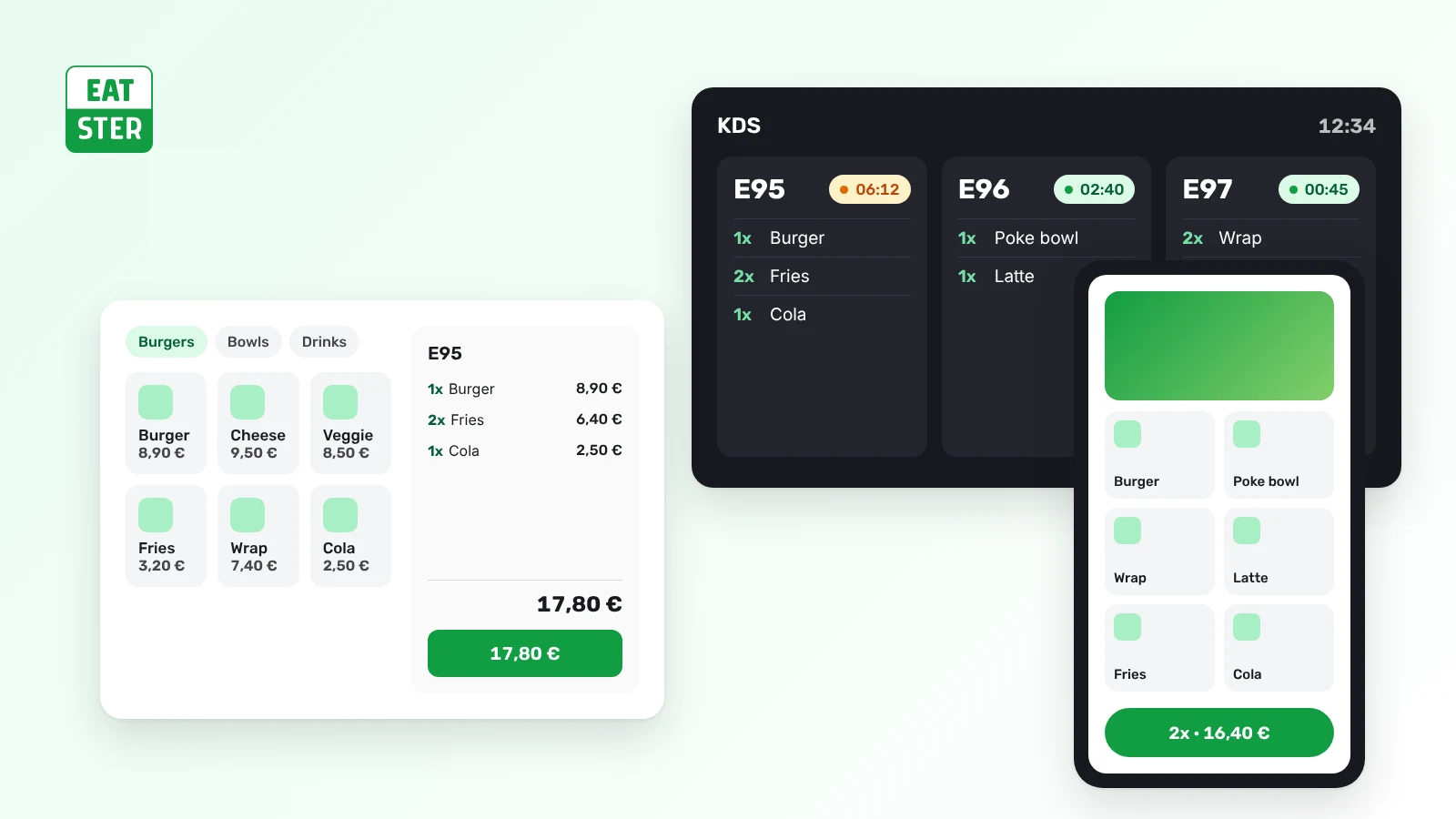
Choosing a restaurant POS system is one of the decisions that quietly shapes every shift. A modern point of sale is no longer just a box that prints receipts – it is the hub of your operation. It takes orders from every channel, routes them to the kitchen, processes payments, tracks stock and gives you the numbers you need to run the business. This restaurant POS system guide walks you through the features that matter, the real cost behind the price tag and a simple process for picking the right system.
What a restaurant POS system does – and why it matters
A POS system is the software and hardware every order and payment passes through. Restaurants have needs a regular shop does not: tables and split bills, dishes with sides and modifiers, a kitchen that has to know what to cook and when, and guests who increasingly want to order on their own – on a kiosk, by scanning a QR code at the table or in a mobile app.
The right system saves staff time, cuts mistakes between the floor and the kitchen and helps lift the average ticket. The wrong one slows you down at peak hours, forces you to juggle several disconnected apps and hides costs in fees you did not notice when signing.
Compliance: fiscal rules and cashless payments
Most European markets have fiscal rules for recording sales. In Slovakia, for example, every sale must be registered in the eKasa system run by the Financial Administration; a new act on sales recording (No. 384/2025) took effect on 1 January 2026, and since 1 May 2026 sellers must also let customers pay without cash. Whatever country you operate in, check:
- how the system meets local fiscal requirements and who is responsible for certification,
- which cashless methods it supports – card terminals, card payments on kiosks, QR payments and in-app payments,
- whether the vendor keeps the software up to date when rules change, without forcing you to replace hardware.
For anything legal, double-check with your accountant or the tax authority – these rules change often.
Core features to look for
1. Fast ordering and table management
Staff should be able to ring up an order in a few taps. Full-service restaurants need a table map, split and merged bills, moving items between tables and voids with a recorded reason.
2. A connected kitchen
Paper tickets get lost and never tell you how long an order has been waiting. A kitchen display system (KDS) shows orders in real time, sorts them by station and marks what is ready.
3. Every ordering channel in one system
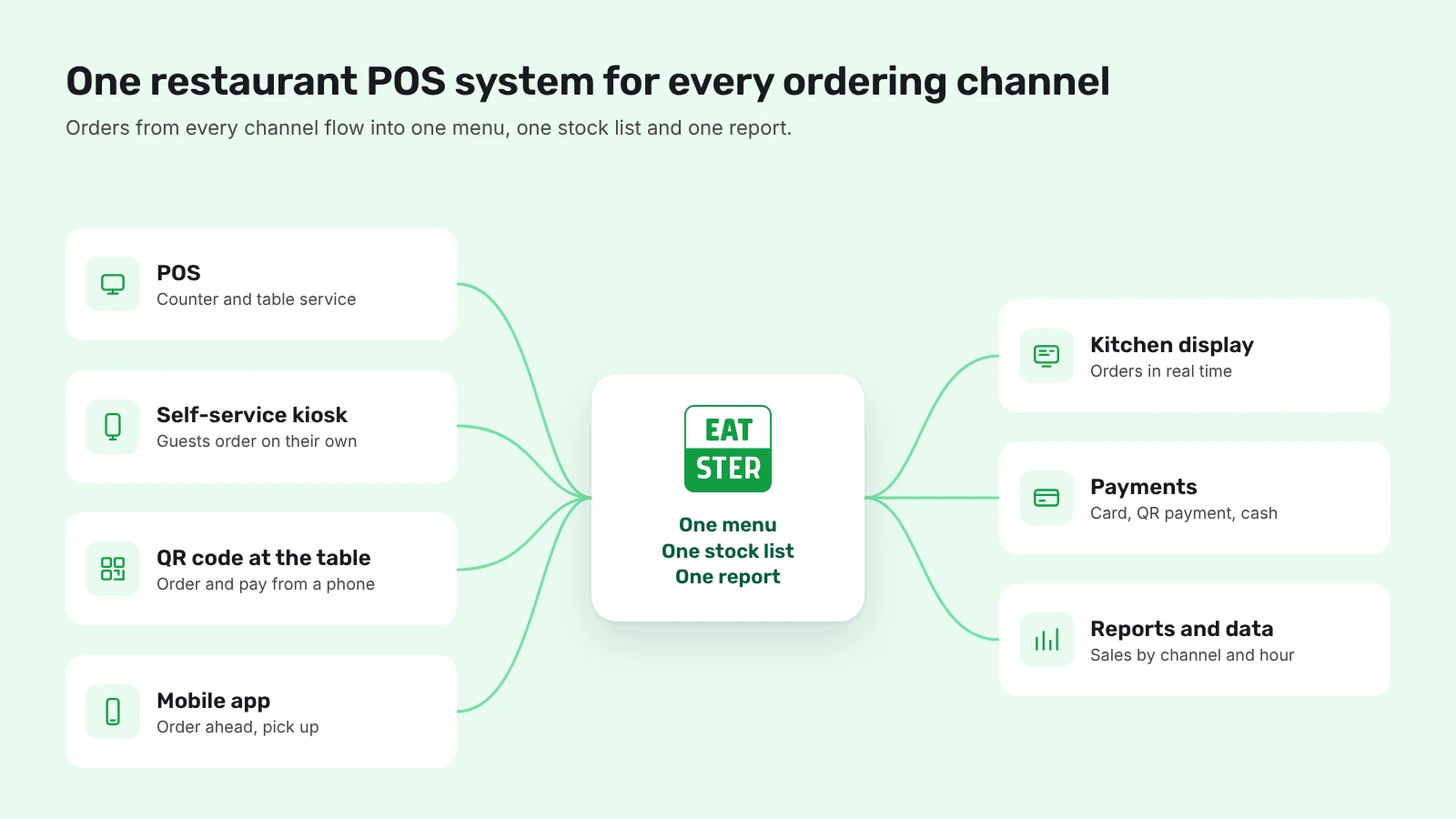
Counter orders are only part of the picture. Guests like to order on a self-service kiosk, via QR code ordering at the table or ahead of time in an app. What matters is that all of these run on one menu, one stock list and one report – otherwise you will be updating prices in three places.
4. Menus, variants and modifiers
Extra bacon, no onions, large fries – the system must handle sides, required and optional choices and time-limited offers such as lunch menus or happy hour. A price change should appear on every device instantly.
5. Stock and recipes
If the POS knows your recipes, it can deduct ingredients with every sale and warn you before something runs out. Small bistros may only need a quick "sold out" switch; larger venues benefit from full inventory tracking.
6. Reporting
Sales by hour, best sellers, performance by channel and average ticket should be available at any time, including on your phone. Without that data, pricing, staffing and menu decisions are guesswork.
7. Payments and fees
Card fees add up. At higher volumes, a fraction of a percent can mean hundreds or thousands of euros a year. Ask for the exact card rates, any monthly terminal fees and whether you can choose your own bank or payment provider.
How much does a restaurant POS cost?
Add up the total cost of ownership over, say, three years:
- software licence – usually a monthly fee per device or location,
- hardware – tablets or terminals, printers, cash drawers, kiosks, kitchen screens,
- card processing fees – a percentage of every transaction,
- add-on modules – inventory, delivery, loyalty, accounting integrations,
- setup, training and support.
Be wary of "cheap" offers that make up for a low licence with higher transaction fees or expensive add-ons. Eatster licences start at €0 per month with the lowest card fees – see current plans on our pricing page.
Cloud or on-premise?
A cloud POS stores data online, so you can check it from anywhere, updates arrive automatically and a new device is up and running in minutes. Good cloud systems also cope with short internet outages and sync orders once the connection is back. On-premise setups can make sense in niche cases but usually mean higher upfront costs and backups to manage.
Common mistakes when choosing a POS
- Comparing only the monthly licence. Card fees and add-ons often make up most of the real cost.
- Getting locked into proprietary hardware. Every replacement or expansion becomes expensive.
- Ignoring self-service. Even if you are not planning kiosks or QR ordering yet, pick a system that can add them without migrating data.
- Underestimating training. Staff turnover is high in hospitality – a system a new server learns in one shift saves money.
- Weak evening and weekend support. Problems tend to happen on a Saturday night; check when support is available.
How to choose a restaurant POS system in 6 steps
- Map your operation. Tables, counters, pickup points, where queues form and how many orders you handle at peak.
- Decide on your ordering channels. Counter and servers only, or kiosks, QR ordering and an app too?
- Calculate total cost. Licence, hardware, card fees and add-ons over at least three years.
- Check compliance. Fiscal requirements and cashless payment support.
- Test it. A demo with your own menu tells you more than any brochure.
- Ask for references. Talk to venues of a similar type and size.
Why venues choose the Eatster ecosystem
Eatster brings the POS, self-service kiosks, QR ordering, a mobile app and a kitchen display together in one system with one menu and one set of reports. Orders placed through the Eatster ecosystem are on average 15% higher, and venues can save up to 25% of operating costs. Eatster processes more than 100,000 transactions a month and operates in 3 countries, with clients such as Aupark, Cassovar, X-BIONIC SPHERE, HC Slovan and OC Laugaricio. Read more stories from our customers.
Summary
A good restaurant POS system is quick to use, connected to the kitchen, open to every ordering channel, transparent on price and ready for regulatory change. Take your time, add up the real costs and try the system before you commit.
Want to see how Eatster would work in your venue? Try the demo or get in touch – we are happy to help.

